


Page 198 - Basic Course
P. 198
KNX BASIC COURSE


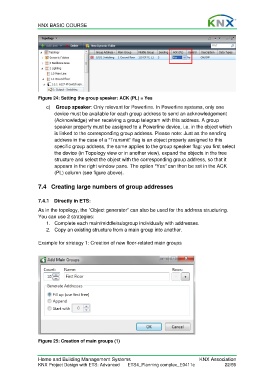
                  Figure 24: Setting the group speaker: ACK (PL) = Yes

                      c)   Group speaker: Only relevant for Powerline. In Powerline systems, only one
                         device must be available for each group address to send an acknowledgement
                         (Acknowledge) when receiving a group telegram with this address. A group
                         speaker property must be assigned to a Powerline device, i.e. in the object which
                         is linked to the corresponding group address. Please note: Just as the sending
                         address in the case of a “Transmit” flag is an object property assigned to this
                         specific group address, the same applies to the group speaker flag: you first select
                         the device (in Topology view or in another view), expand the objects in the tree
                         structure and select the object with the corresponding group address, so that it
                         appears in the right window pane. The option “Yes” can then be set in the ACK
                         (PL) column (see figure above).


                  7.4  Creating large numbers of group addresses


                  7.4.1  Directly in ETS:
                  As in the topology, the “Object generator” can also be used for the address structuring.
                  You can use 2 strategies:
                      1.  Complete each main/middle/subgroup individually with addresses.
                      2.  Copy an existing structure from a main group into another.

                  Example for strategy 1: Creation of new floor-related main groups


                  Figure 25: Creation of main groups (1)


                  Home and Building Management Systems                                    KNX Association
                  KNX Project Design with ETS: Advanced   ETS4_Planning complex_E0411c               22/59

