


Page 269 - Advanced Course
P. 269
KNX ADVANCED COURSE
4.2.1 Reading out the property of a device
Some KNX system profiles allow storing data in data structures called properties of
interface objects, which have been standardized system wide (“device object”) or for a
specific class of devices (e.g. dimming actuators).
Such properties can be read out for KNX devices complying with certain system profiles
(e.g. System 2, 7,…): the data can then be interpreted without the need to know the
device’s internal memory structure or storage location of the data.
For manufacturer specific extensions there is however also a manufacturer specific range
of KNX interface objects and properties.
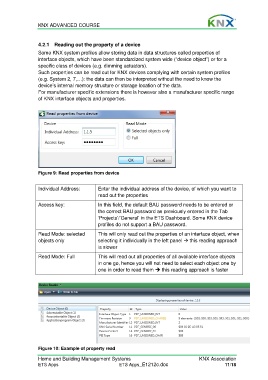
Figure 9: Read properties from device
Individual Address: Enter the individual address of the device, of which you want to
read out the properties
Access key: In this field, the default BAU password needs to be entered or
the correct BAU password as previously entered in the Tab
‘Projects’/’General’ in the ETS Dashboard. Some KNX device
profiles do not support a BAU password.
Read Mode: selected This will only read out the properties of an interface object, when
objects only selecting it individually in the left panel this reading approach
is slower
Read Mode: Full This will read out all properties of all available interface objects
in one go, hence you will not need to select each object one by
one in order to read them this reading approach is faster
Figure 10: Example of property read
Home and Building Management Systems KNX Association
ETS Apps ETS Apps_E1212c.doc 11/18

