


Page 273 - Advanced Course
P. 273
KNX ADVANCED COURSE


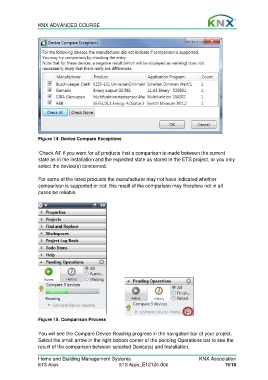
                  Figure 14: Device Compare Exceptions

                  ‘Check All’ if you want for all products that a comparison is made between the current
                  state as in the installation and the expected state as stored in the ETS project, or you only
                  select the device(s) concerned.

                  For some of the listed products the manufacturer may not have indicated whether
                  comparison is supported or not: this result of the comparison may therefore not in all
                  cases be reliable.


                  Figure 15: Comparison Process

                  You will see the Compare Device Reading progress in the navigation bar of your project.
                  Select the small arrow in the right bottom corner of the pending Operations bar to see the
                  result of the comparison between selected Device(s) and Installation.

                  Home and Building Management Systems                                    KNX Association
                  ETS Apps                            ETS Apps_E1212c.doc                            15/18

