


Page 272 - Advanced Course
P. 272
KNX ADVANCED COURSE


                  4.3  Project Compare

                  The App “Project Compare” enables the system integrator to compare the available data
                  in the ETS project to the individual devices in the installation. In this way the current state
                  as loaded in the installation can be compared with the expected state as contained in the
                  ETS project.

                  Hence, the user has the possibility to check whether the project is still up to date. Rather
                  than to guess, he can exactly know which changes have been made in the ETS project or
                  in the installation.

                  The dissimilarities in device configurations are shown.


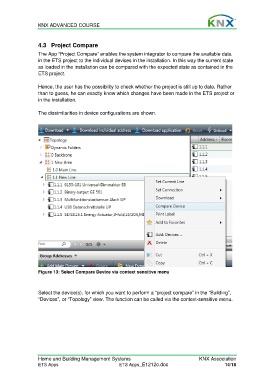
                  Figure 13: Select Compare Device via context sensitive menu


                  Select the device(s), for which you want to perform a “project compare” in the “Building”,
                  “Devices”, or “Topology” view. The function can be called via the context-sensitive menu.


                  Home and Building Management Systems                                    KNX Association
                  ETS Apps                            ETS Apps_E1212c.doc                            14/18

