


Page 146 - Robot Design Handbook ROBOCON Malaysia 2019
P. 146
Formula will be used to calculate the radius and the angle or the joystick from the

               xy coordinate. Then based on the angle and the radius we will signal the robot to move in
               certain  direction.  In  addition,  PID  controllers  are  used  on  the  motor  to  smoothen  the

               acceleration and deceleration of the motor. This will reduce the sudden increase of speed
               and vibration of the robot.


               2.2.2 The MR2 Software Design


                       The  main  processor  for  our  auto-robot  is  a  raspberry-pi  B,  which  runs  Robot

               Operating  System  (ROS)  on  Ubuntu.  The  reason  we  use  ROS  is  to  avoid  continuous
               reinventing  the  wheel,  and  to  offer  standardised  functionalities  performing  hardware

               abstraction, just like a conventional OS for PCs. These processes are grouped into Packages
               which can be easily shared and distributed. A node is like an executable file within the ROS

               package. ROS nodes use a ROS client library to communicate with other nodes. We had

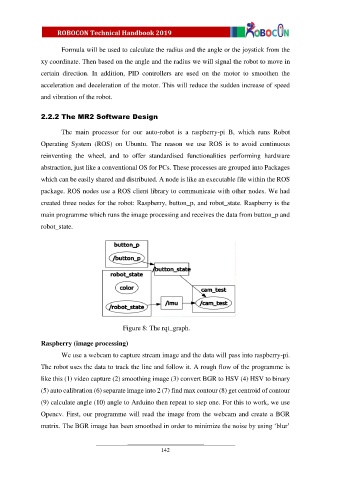
               created three nodes for the robot: Raspberry, button_p, and robot_state. Raspberry is the
               main programme which runs the image processing and receives the data from button_p and

               robot_state.


                                            Figure 8: The rqt_graph.

               Raspberry (image processing)

                       We use a webcam to capture stream image and the data will pass into raspberry-pi.

               The robot uses the data to track the line and follow it. A rough flow of the programme is
               like this (1) video capture (2) smoothing image (3) convert BGR to HSV (4) HSV to binary

               (5) auto calibration (6) separate image into 2 (7) find max contour (8) get centroid of contour
               (9) calculate angle (10) angle to Arduino then repeat to step one. For this to work, we use

               Opencv. First, our programme will read the image from the webcam and create a BGR
               matrix. The BGR image has been smoothed in order to minimize the noise by using ‘blur’


                                                          142

