


Page 147 - Robot Design Handbook ROBOCON Malaysia 2019
P. 147
function which is from the library of opencv. After that, the BRG image is converted into

                  HSV by using ‘cvtColor’ function. HSV is further converted into binary image by ‘inRange’
                  function. The line will become white colour, everything other than the line will become

                  black  [4].  After  that,  an  auto  calibration  will  be  carried  out  where  the  robot  will  auto
                  calibrate the image until it sees there is only a straight white line in the binary image. Auto

                  calibration is carried by using ‘inRange’, ‘HoughLines’ transform and ‘findContours’. The

                  parameter for inRange function is the HSV value.


                  inRange(               frame_HSV,                Scalar(low_H,                 low_S,
                  low_V),Scalar(high_H, high_S, high_V),frame_threshold);

                         Our  programme  will  continuously  manipulate  the  parameter  for  the  HSV  value
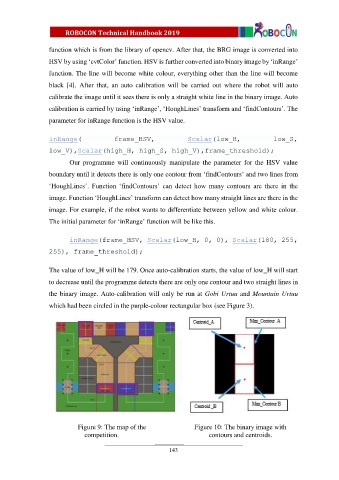
                  boundary until it detects there is only one contour from ‘findContours’ and two lines from

                  ‘HoughLines’.  Function  ‘findContours’  can  detect  how  many  contours  are  there  in  the
                  image. Function ‘HoughLines’ transform can detect how many straight lines are there in the

                  image. For example, if the robot wants to differentiate between yellow and white colour.

                  The initial parameter for ‘inRange’ function will be like this.


                         inRange(frame_HSV, Scalar(low_H, 0, 0), Scalar(180, 255,
                  255), frame_threshold);


                  The value of low_H will be 179. Once auto-calibration starts, the value of low_H will start

                  to decrease until the programme detects there are only one contour and two straight lines in

                  the binary image. Auto-calibration will only be run at Gobi Urtuu and Mountain Urtuu
                  which had been circled in the purple-colour rectangular box (see Figure 3).


                            Figure 9: The map of the                 Figure 10: The binary image with
                               competition.                               contours and centroids.


                                                            143

