


Page 30 - X-Air User's Manual
P. 30
30  X AIR User Manual


           Buses Utility                                       7.14  Auto Mix


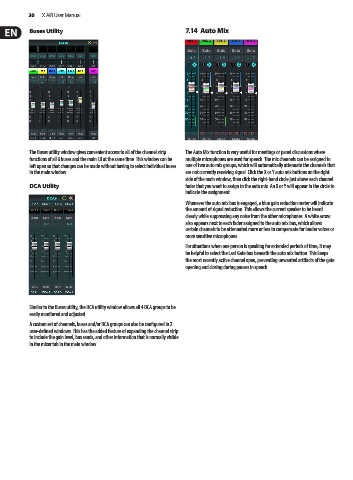
           The Buses utility window gives convenient access to all of the channel strip   The Auto Mix function is very useful for meetings or panel discussions where
           functions of all 6 buses and the main LR at the same time. This window can be   multiple microphones are used for speech. The mic channels can be assigned to
           left open so that changes can be made without having to select individual buses   one of two auto mix groups, which will automatically attenuate the channels that
           in the main window.                                 are not currently receiving signal. Click the X or Y auto mix buttons on the right
                                                               side of the main window, then click the right-hand circle just above each channel
           DCA Utility                                         fader that you want to assign to the auto mix. An X or Y will appear in the circle to
                                                               indicate the assignment.
                                                               Whenever the auto mix bus is engaged, a blue gain reduction meter will indicate
                                                               the amount of signal reduction. This allows the current speaker to be heard
                                                               clearly while suppressing any noise from the other microphones. A white arrow
                                                               also appears next to each fader assigned to the auto mix bus, which allows
                                                               certain channels to be attenuated more or less to compensate for louder voices or
                                                               more sensitive microphones.
                                                               For situations when one person is speaking for extended periods of time, it may
                                                               be helpful to select the Last Gate box beneath the auto mix button. This keeps
                                                               the most recently active channel open, preventing unwanted artifacts of the gate
                                                               opening and closing during pauses in speech.


           Similar to the Buses utility, the DCA utility window allows all 4 DCA groups to be
           easily monitored and adjusted.
           A custom set of channels, buses and/or DCA groups can also be configured in 2
           user-defined windows. This has the added feature of expanding the channel strip
           to include the gain level, bus sends, and other information that is normally visible
           in the mixer tab in the main window.

