


Page 35 - X-Air User's Manual
P. 35
35   X AIR User Manual

        10.  Effect Descriptions                            Vintage Reverb

        Here is a list and brief description of the effects available on the X AIR mixers.
        When Stereo and Dual versions of an effect are offered, use the Stereo version
        when the left and right signal are to be altered together (e.g. on linked stereo
        channels or buses), or Dual when you want to dial different settings for the left
        and right signal.
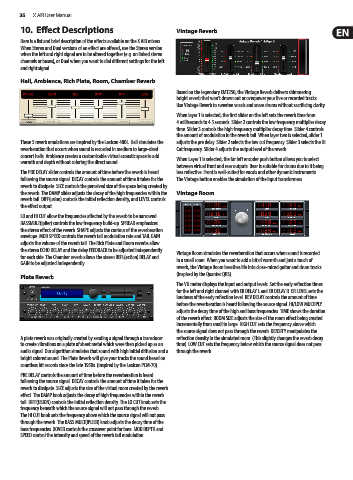
        Hall, Ambience, Rich Plate, Room, Chamber Reverb
                                                            Based on the legendary EMT250, the Vintage Reverb delivers shimmering
                                                            bright reverb that won’t drown out or overpower your live or recorded tracks.
                                                            Use Vintage Reverb to sweeten vocals and snare drums without sacrificing clarity.

                                                            When layer 1 is selected, the first slider on the left sets the reverb time from
                                                            4 milliseconds to 4.5 seconds. Slider 2 controls the low frequency multiplier decay
                                                            time. Slider 3 controls the high frequency multiplier decay time. Slider 4 controls
                                                            the amount of modulation in the reverb tail. When layer two is selected, slider 1
        These 5 reverb emulations are inspired by the Lexicon 480L. Hall simulates the   adjusts the pre delay. Slider 2 selects the low cut frequency. Slider 3 selects the Hi
        reverberation that occurs when sound is recorded in medium to large-sized   Cut frequency. Slider 4 adjusts the output level of the reverb.
        concert halls. Ambience creates a customizable virtual acoustic space to add
        warmth and depth without coloring the direct sound.  When Layer 1 is selected, the far left encoder push button allows you to select
                                                            between virtual front and rear outputs. Rear is suitable for drums due to it being
        The PRE DELAY slider controls the amount of time before the reverb is heard   less reflective. Front is well-suited for vocals and other dynamic instruments.
        following the source signal. DECAY controls the amount of time it takes for the   The Vintage button enables the simulation of the input transformers.
        reverb to dissipate. SIZE controls the perceived size of the space being created by
        the reverb. The DAMP slider adjusts the decay of the high frequencies within the   Vintage Room
        reverb tail. DIFF(usion) controls the initial reflection density, and LEVEL controls
        the effect output.
        LO and HI CUT allow the frequencies affected by the reverb to be narrowed.
        BASSMULT(iplier) controls the low frequency build-up. SPREAD emphasizes
        the stereo effect of the reverb. SHAPE adjusts the contour of the reverberation
        envelope. MOD SPEED controls the reverb tail modulation rate and TAIL GAIN
        adjusts the volume of the reverb tail. The Rich Plate and Room reverbs allow
        the stereo ECHO DELAY and the delay FEEDBACK to be adjusted independently
        for each side. The Chamber reverb allows the stereo REFL(ection) DELAY and   Vintage Room simulates the reverberation that occurs when sound is recorded
                                                            in a small room. When you want to add a bit of warmth and just a touch of
        GAIN to be adjusted independently.
                                                            reverb, the Vintage Room breathes life into close-miced guitar and drum tracks.
        Plate Reverb                                        (Inspired by the Quantec QRS)
                                                            The VU meter displays the input and output levels. Set the early reflection times
                                                            for the left and right channel with ER DELAY L and ER DELAY R. ER LEVEL sets the
                                                            loudness of the early reflection level. REV DELAY controls the amount of time
                                                            before the reverberation is heard following the source signal. HI/LOW MULTIPLY
                                                            adjusts the decay time of the high and bass frequencies. TIME shows the duration
                                                            of the reverb effect. ROOM SIZE adjusts the size of the room effect being created
                                                            incrementally from small to large. HIGH CUT sets the frequency above which
                                                            the source signal does not pass through the reverb. DENSITY manipulates the
        A plate reverb was originally created by sending a signal through a transducer   reflection density in the simulated room. (This slightly changes the reverb decay
        to create vibrations on a plate of sheet metal which were then picked up as an   time). LOW CUT sets the frequency below which the source signal does not pass
        audio signal. Our algorithm simulates that sound with high initial diffusion and a   through the reverb.
        bright colored sound. The Plate Reverb will give your tracks the sound heard on
        countless hit records since the late 1950s. (Inspired by the Lexicon PCM-70)
        PRE DELAY controls the amount of time before the reverberation is heard
        following the source signal. DECAY controls the amount of time it takes for the
        reverb to dissipate. SIZE adjusts the size of the virtual room created by the reverb
        effect. The DAMP knob adjusts the decay of high frequencies within the reverb
        tail. DIFF(USION) controls the initial reflection density. The LO CUT knob sets the
        frequency beneath which the source signal will not pass through the reverb.
        The HI CUT knob sets the frequency above which the source signal will not pass
        through the reverb. The BASS MULT(IPLIER) knob adjusts the decay time of the
        bass frequencies. XOVER controls the crossover point for bass. MOD DEPTH and
        SPEED control the intensity and speed of the reverb tail modulation.

