


Page 118 - digitalliteracy
P. 118
6.1  Leaving a Trail on the Web


                       When you visit a website, its URL is recorded in your computer browser history files. You
                       can see some of this historical record yourself by clicking the down arrow at the end of the
                       address bar at the top of any page of your web browser. Law enforcement officials and investi-
                       gators often obtain court orders to search the computers of crime suspects for evidence. They
                       can often retrieve the entire history file on the computer and determine what websites users
                       of that computer have visited.

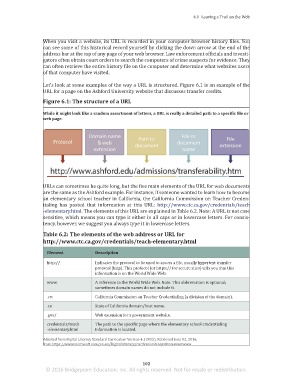
                       Let’s look at some examples of the way a URL is structured. Figure 6.1 is an example of the
                       URL for a page on the Ashford University website that discusses transfer credits.
                       Figure 6.1: The structure of a URL


                       While it might look like a random assortment of letters, a URL is really a detailed path to a specific file or
                       web page.


                       URLs can sometimes be quite long, but the five main elements of the URL for web documents
                       are the same as the Ashford example. For instance, if someone wanted to learn how to become
                       an elementary school teacher in California, the California Commission on Teacher Creden-
                       tialing  has posted that  information at  this URL:  http://www.ctc.ca.gov/credentials/teach
                       -elementary.html. The elements of this URL are explained in Table 6.2. Note: A URL is not case
                       sensitive, which means you can type it either in all caps or in lowercase letters. For consis-
                       tency, however, we suggest you always type it in lowercase letters.

                       Table 6.2: The elements of the web address or URL for
                       http://www.ctc.ca.gov/credentials/teach-elementary.html

                         Element             Description

                         http://             Indicates the protocol to be used to access a file, usually hypertext transfer
                                             protocol (http). This protocol (or https:// for secure sites) tells you that this
                                             information is on the World Wide Web.
                         www.                A reference to the World Wide Web. Note: This abbreviation is optional;
                                             sometimes domain names do not include it.

                         .ctc                California Commission on Teacher Credentialing (a division of the domain).
                         .ca                 State of California domain/host name.
                         .gov/               Web extension for a government website.

                         credentials/teach   The path to the specific page where the elementary school credentialing
                         -elementary.html    information is located.

                       Adapted from Digital Literacy Standard Curriculum Version 4. (2015). Retrieved June 02, 2016,
                       from https://www.microsoft.com/en-us/DigitalLiteracy/curriculum4.aspx#interenetwww


                                                                 102
                        © 2016 Bridgepoint Education, Inc. All rights reserved. Not for resale or redistribution.


       sol82612_06_m06_097-120.indd   102                                                                            6/29/16   5:14 PM

