


Page 119 - digitalliteracy
P. 119
6.1  Leaving a Trail on the Web


                       The Trail of Browser Cookies


                       When your computer browser accesses a website for the first time, the website sends back
                       its IP address and other information to help the browser navigate the site and perform cer-
                       tain functions. The browser creates a small text file, called a browser cookie or a tracking
                       cookie, that contains information such as your computer IP address, which website pages
                       you viewed, and how long you stayed on each page.

                       Cookies can often be very helpful to you. They make using the web easier in many ways. Some
                       cookies, for example, store information so that if you leave a web page and return later, you
                       can pick up where you left off browsing the site, without having to start over. If you are on a
                       secure website (https://), however, the site will create another type of cookie so that when
                       you close your browser or the website is inactive for a certain period of time, the site will be
                       closed to protect your data. You must then log in and enter your password again to continue.

                       Cookies come in several different forms. Some are temporary and usually are deleted when
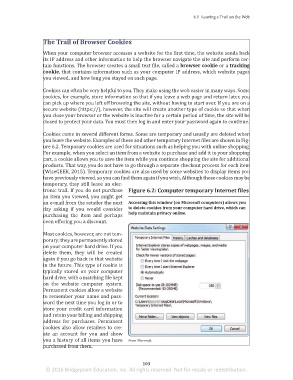
                       you leave the website. Examples of these and other temporary Internet files are shown in Fig-
                       ure 6.2. Temporary cookies are used for situations such as helping you with online shopping.
                       For example, when you select an item from a website to purchase and add it to your shopping
                       cart, a cookie allows you to save the item while you continue shopping the site for additional
                       products. That way, you do not have to go through a separate checkout process for each item
                       (WiseGEEK, 2015). Temporary cookies are also used by some websites to display items you
                       have previously viewed, so you can find them again if you wish. Although these cookies may be
                       temporary, they still leave an elec-
                       tronic trail. If you do not purchase  Figure 6.2: Computer temporary Internet files

                       an item you viewed, you might get
                       an e-mail from the retailer the next   Accessing this window (on Microsoft computers) allows you
                                                           to delete cookies from your computer hard drive, which can
                       day asking  if you would consider
                                                           help maintain privacy online.
                       purchasing the item and perhaps
                       even offering you a discount.

                       Most cookies, however, are not tem-
                       porary; they are permanently stored
                       on your computer hard drive. If you
                       delete them, they will  be created
                       again if you go back to that website
                       in the future. This type of cookie is
                       typically stored on your computer
                       hard drive, with a matching file kept
                       on the website computer system.
                       Permanent cookies allow a website
                       to remember your name and pass-
                       word the next time you log in or to
                       store your credit card information
                       and retain your billing and shipping
                       address for purchases. Permanent
                       cookies also allow retailers to cre-
                       ate  an account for  you and show
                       you a history of all items you have   From Microsoft.
                       purchased from them.


                                                                 103
                        © 2016 Bridgepoint Education, Inc. All rights reserved. Not for resale or redistribution.


       sol82612_06_m06_097-120.indd   103                                                                            6/29/16   5:14 PM

