


Page 14 - Computing E-Book Grade 6
P. 14
The City School  2021-2022


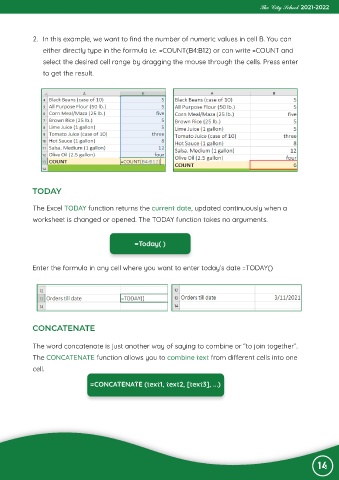
             2.  In this example, we want to find the number of numeric values in cell B. You can

                either directly type in the formula i.e. =COUNT(B4:B12) or can write =COUNT and
                select the desired cell range by dragging the mouse through the cells. Press enter

                to get the result.


            TODAY

             The Excel TODAY function returns the current date, updated continuously when a

             worksheet is changed or opened. The TODAY function takes no arguments.


                                                =Today( )


            Enter the formula in any cell where you want to enter today’s date =TODAY()


            CONCATENATE


             The word concatenate is just another way of saying to combine or “to join together”.
             The CONCATENATE function allows you to combine text from different cells into one

             cell.

                                 =CONCATENATE (text1, text2, [text3], ...)


                                                                                                                 14

