


Page 19 - Computing E-Book Grade 6
P. 19
The City School  2021-2022


             SUBSTITUTE


            Using the SUBSTITUTE function, we can replace the part of the text in a cell. The
                                                                                                                    Analysing Data
            substitute function is represented as: =SUBSTITUTE(text, old_text, new_text, [instance_
            num])


                                      =SUBSTITUTE (text, old_text, new_
                                      text, [instance])


             •  Text (required argument): this is the text or

                reference to a cell that contains text for which we
                want to substitute characters.

             •  Old_text (required argument): the text we wish to                  Checkpoint
                replace.
                                                                              The COUNT function is used to calculate
             •  New_text (required argument): the text we want                the number of cells that contain
                                                                              numbers.
                to replace the old_text with.                                 TODAY function returns the current date.

             •  Instance_num (optional argument): specifies                   CONCATENATE function allows you to
                                                                              combine text from different cells into one
                which occurrence of old_text you want to replace              cell.

                with new_text. If you specify instance_num, only
                that instance of old_text is replaced. Otherwise,

                every occurrence of old_text in text is changed to
                new_text.


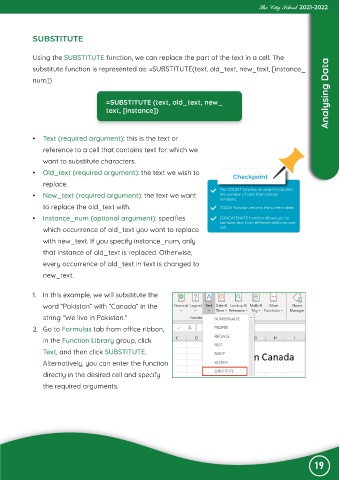
             1.  In this example, we will substitute the
                word “Pakistan“ with “Canada“ in the
                string “We live in Pakistan.“

             2.  Go to Formulas tab from office ribbon,

                in the Function Library group, click
                Text, and then click SUBSTITUTE.
                Alternatively, you can enter the function

                directly in the desired cell and specify

                the required arguments.


                                                                                                                19

