


Page 148 - Computing E-Book Grade 6
P. 148
The City School  2021-2022


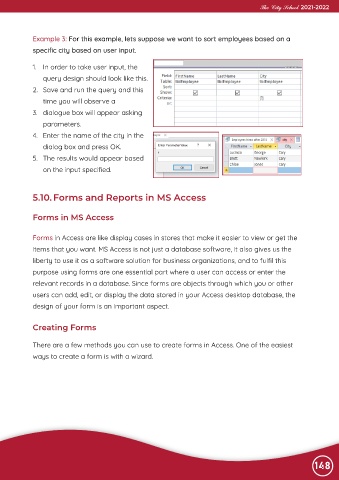
             Example 3: For this example, lets suppose we want to sort employees based on a

             specific city based on user input.


             1.  In order to take user input, the
                query design should look like this.
             2.  Save and run the query and this

                time you will observe a

             3.  dialogue box will appear asking
                parameters.
             4.  Enter the name of the city in the

                dialog box and press OK.

             5.  The results would appear based
                on the input specified.


             5.10. Forms and Reports in MS Access


             Forms in MS Access


             Forms in Access are like display cases in stores that make it easier to view or get the

             items that you want. MS Access is not just a database software, it also gives us the
             liberty to use it as a software solution for business organizations, and to fulfil this
             purpose using forms are one essential part where a user can access or enter the

             relevant records in a database. Since forms are objects through which you or other

             users can add, edit, or display the data stored in your Access desktop database, the
             design of your form is an important aspect.


             Creating Forms


             There are a few methods you can use to create forms in Access. One of the easiest

             ways to create a form is with a wizard.


                                                                                                                148

