


Page 164 - Computing E-Book Grade 6
P. 164
The City School  2021-2022


             EdScratch’s intuitive layout and the simplicity of block-based coding makes EdScratch

             an ideal programming language for students aged 10 and up. You can access
             EdScratch online at www.edscratchapp.com


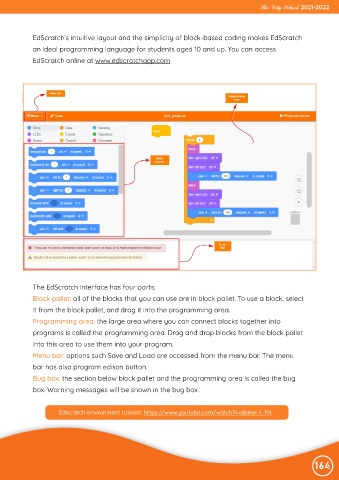
             The EdScratch interface has four parts:
             Block pallet: all of the blocks that you can use are in block pallet. To use a block, select

             it from the block pallet, and drag it into the programming area.
             Programming area: the large area where you can connect blocks together into

             programs is called the programming area. Drag and drop blocks from the block pallet
             into this area to use them into your program.

             Menu bar: options such Save and Load are accessed from the menu bar. The menu
             bar has also program edison button.

             Bug box: the section below block pallet and the programming area is called the bug
             box. Warning messages will be shown in the bug box.


                      Edscratch environment tutorial: https://www.youtube.com/watch?v=6binei-1_PA


                                                                                                                164

