


Page 30 - Computing E-Book Grade 6
P. 30
The City School  2021-2022


             1.5.  Modifying Worksheets in Excel


             Renaming Worksheet in Excel

             Whenever you create a new Excel workbook, it will contain one worksheet named

             Sheet1. You can rename a worksheet to better reflect its content. In our example, we
             will rename our worksheet to ICTECH to indicate that it represents students grade

             report in the ICTECH subject.
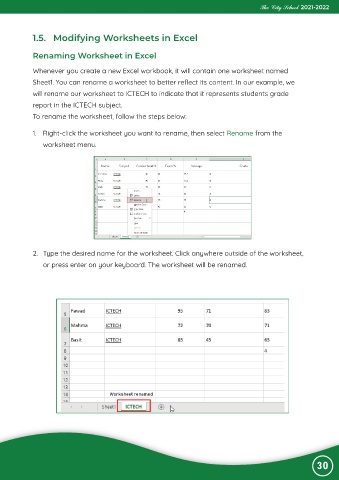
             To rename the worksheet, follow the steps below:


             1.  Right-click the worksheet you want to rename, then select Rename from the
                worksheet menu.


             2.  Type the desired name for the worksheet. Click anywhere outside of the worksheet,

                or press enter on your keyboard. The worksheet will be renamed.


                                                                                                                30

