


Page 55 - Computing E-Book Grade 6
P. 55
The City School  2021-2022


            2.7.  Spelling and Grammar Check


            When we prepare documents, we sometimes

            make mistakes. Two common types of mistake
            are spelling mistakes and grammar mistakes.

            By default, Microsoft Word checks spelling and                   abc
            grammar automatically as you type, using wavy                                                           Document Creation

            red underlines to indicate possible spelling
            problems and wavy green underlines to indicate

            possible grammatical problems. These mistakes
            can be corrected using an inbuilt spelling and

            grammar feature. Following are the steps to run
            spelling and grammar check:


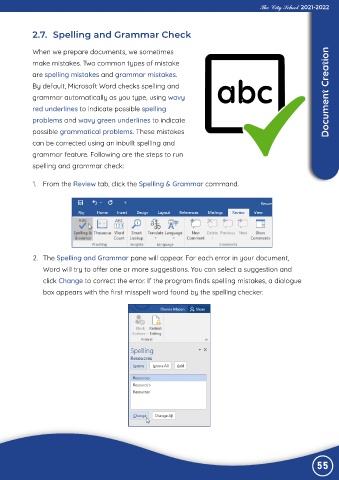
             1.  From the Review tab, click the Spelling & Grammar command.


             2.  The Spelling and Grammar pane will appear. For each error in your document,

                Word will try to offer one or more suggestions. You can select a suggestion and
                click Change to correct the error. If the program finds spelling mistakes, a dialogue

                box appears with the first misspelt word found by the spelling checker.


                                                                                                                55

