


Page 983 - Windows 10 May 2019 Update The Missing Manual: The Book That Should Have Been in the Box
P. 983
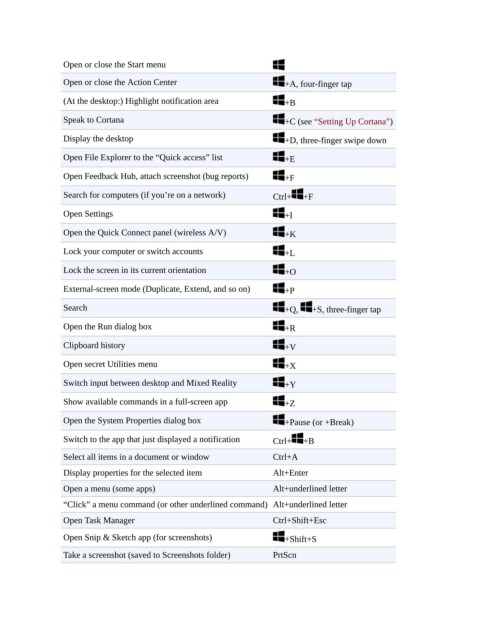
Open or close the Start menu

                 Open or close the Action Center                          +A, four-finger tap

                 (At the desktop:) Highlight notification area            +B

                 Speak to Cortana                                         +C (see “Setting Up Cortana”)

                 Display the desktop                                      +D, three-finger swipe down

                 Open File Explorer to the “Quick access” list            +E

                 Open Feedback Hub, attach screenshot (bug reports)       +F

                 Search for computers (if you’re on a network)         Ctrl+  +F

                 Open Settings                                            +I

                 Open the Quick Connect panel (wireless A/V)              +K

                 Lock your computer or switch accounts                    +L

                 Lock the screen in its current orientation               +O

                 External-screen mode (Duplicate, Extend, and so on)      +P

                 Search                                                   +Q,    +S, three-finger tap

                 Open the Run dialog box                                  +R

                 Clipboard history                                        +V

                 Open secret Utilities menu                               +X

                 Switch input between desktop and Mixed Reality           +Y

                 Show available commands in a full-screen app             +Z

                 Open the System Properties dialog box                    +Pause (or +Break)

                 Switch to the app that just displayed a notification  Ctrl+  +B

                 Select all items in a document or window              Ctrl+A

                 Display properties for the selected item              Alt+Enter
                 Open a menu (some apps)                               Alt+underlined letter

                 “Click” a menu command (or other underlined command) Alt+underlined letter
                 Open Task Manager                                     Ctrl+Shift+Esc

                 Open Snip & Sketch app (for screenshots)                 +Shift+S

                 Take a screenshot (saved to Screenshots folder)       PrtScn

