


Page 985 - Windows 10 May 2019 Update The Missing Manual: The Book That Should Have Been in the Box
P. 985
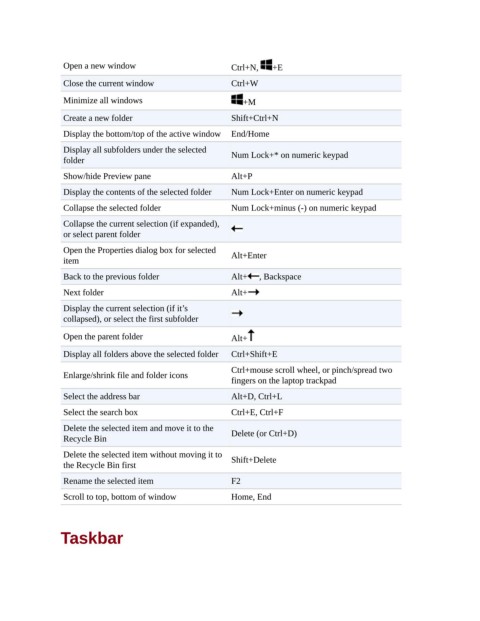
Open a new window                          Ctrl+N,   +E
                 Close the current window                   Ctrl+W

                 Minimize all windows                          +M

                 Create a new folder                        Shift+Ctrl+N
                 Display the bottom/top of the active window  End/Home

                 Display all subfolders under the selected  Num Lock+* on numeric keypad
                 folder
                 Show/hide Preview pane                     Alt+P

                 Display the contents of the selected folder  Num Lock+Enter on numeric keypad
                 Collapse the selected folder               Num Lock+minus (-) on numeric keypad

                 Collapse the current selection (if expanded),
                 or select parent folder

                 Open the Properties dialog box for selected  Alt+Enter
                 item
                 Back to the previous folder                Alt+   , Backspace

                 Next folder                                Alt+
                 Display the current selection (if it’s
                 collapsed), or select the first subfolder

                 Open the parent folder                     Alt+

                 Display all folders above the selected folder  Ctrl+Shift+E
                                                            Ctrl+mouse scroll wheel, or pinch/spread two
                 Enlarge/shrink file and folder icons
                                                            fingers on the laptop trackpad
                 Select the address bar                     Alt+D, Ctrl+L

                 Select the search box                      Ctrl+E, Ctrl+F

                 Delete the selected item and move it to the
                 Recycle Bin                                Delete (or Ctrl+D)

                 Delete the selected item without moving it to  Shift+Delete
                 the Recycle Bin first

                 Rename the selected item                   F2
                 Scroll to top, bottom of window            Home, End


                Taskbar

