


Page 988 - Windows 10 May 2019 Update The Missing Manual: The Book That Should Have Been in the Box
P. 988
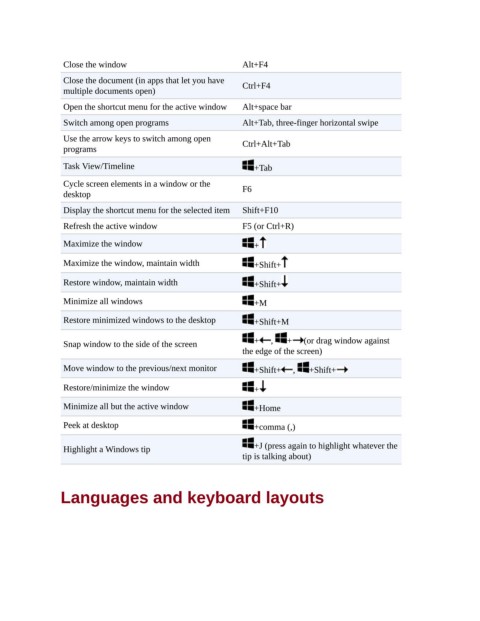
Close the window                              Alt+F4

                 Close the document (in apps that let you have
                 multiple documents open)                      Ctrl+F4
                 Open the shortcut menu for the active window  Alt+space bar

                 Switch among open programs                    Alt+Tab, three-finger horizontal swipe
                 Use the arrow keys to switch among open       Ctrl+Alt+Tab
                 programs

                 Task View/Timeline                               +Tab
                 Cycle screen elements in a window or the
                 desktop                                       F6

                 Display the shortcut menu for the selected item  Shift+F10
                 Refresh the active window                     F5 (or Ctrl+R)

                 Maximize the window                              +

                 Maximize the window, maintain width              +Shift+

                 Restore window, maintain width                   +Shift+

                 Minimize all windows                             +M

                 Restore minimized windows to the desktop         +Shift+M


                 Snap window to the side of the screen            +   ,   +   (or drag window against
                                                               the edge of the screen)

                 Move window to the previous/next monitor         +Shift+   ,   +Shift+

                 Restore/minimize the window                      +

                 Minimize all but the active window               +Home

                 Peek at desktop                                  +comma (,)


                 Highlight a Windows tip                          +J (press again to highlight whatever the
                                                               tip is talking about)


                Languages and keyboard layouts

