


Page 990 - Windows 10 May 2019 Update The Missing Manual: The Book That Should Have Been in the Box
P. 990
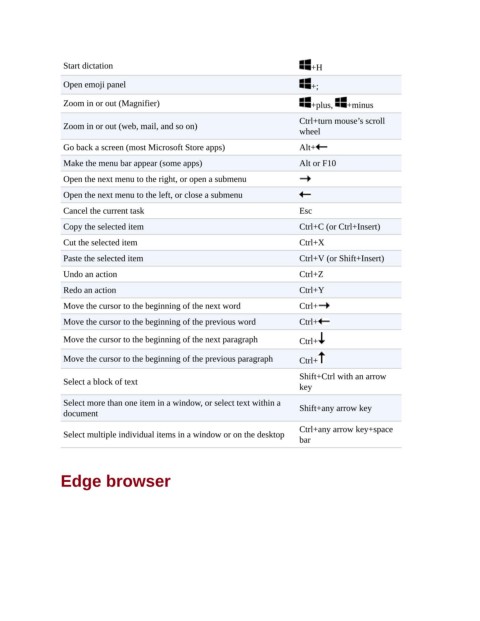
Start dictation                                                +H

                 Open emoji panel                                               +;

                 Zoom in or out (Magnifier)                                     +plus,    +minus
                                                                             Ctrl+turn mouse’s scroll
                 Zoom in or out (web, mail, and so on)
                                                                             wheel

                 Go back a screen (most Microsoft Store apps)                Alt+
                 Make the menu bar appear (some apps)                        Alt or F10

                 Open the next menu to the right, or open a submenu
                 Open the next menu to the left, or close a submenu

                 Cancel the current task                                     Esc
                 Copy the selected item                                      Ctrl+C (or Ctrl+Insert)

                 Cut the selected item                                       Ctrl+X
                 Paste the selected item                                     Ctrl+V (or Shift+Insert)

                 Undo an action                                              Ctrl+Z
                 Redo an action                                              Ctrl+Y

                 Move the cursor to the beginning of the next word           Ctrl+
                 Move the cursor to the beginning of the previous word       Ctrl+

                 Move the cursor to the beginning of the next paragraph      Ctrl+

                 Move the cursor to the beginning of the previous paragraph  Ctrl+

                                                                             Shift+Ctrl with an arrow
                 Select a block of text
                                                                             key
                 Select more than one item in a window, or select text within a  Shift+any arrow key
                 document

                                                                             Ctrl+any arrow key+space
                 Select multiple individual items in a window or on the desktop
                                                                             bar


                Edge browser

