


Page 78 - 18-868 SEO PowerSuite Workflow_VPMGC
P. 78
SEO Workflow


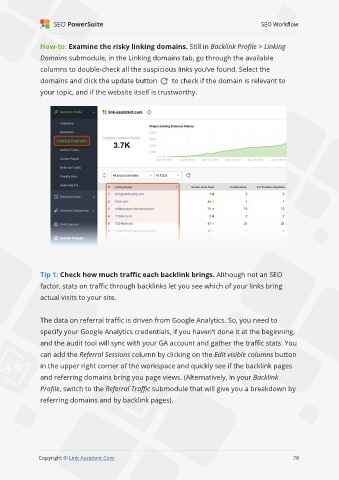
               How-to: Examine the risky linking domains. Still in Backlink Profile > Linking

               Domains submodule, in the Linking domains tab, go through the available
               columns to double-check all the suspicious links you’ve found. Select the

               domains and click the update button            to check if the domain is relevant to
               your topic, and if the website itself is trustworthy.


               Tip 1: Check how much traffic each backlink brings. Although not an SEO

               factor, stats on traffic through backlinks let you see which of your links bring
               actual visits to your site.


               The data on referral traffic is driven from Google Analytics. So, you need to

               specify your Google Analytics credentials, if you haven’t done it at the beginning,
               and the audit tool will sync with your GA account and gather the traffic stats. You

               can add the Referral Sessions column by clicking on the Edit visible columns button
               in the upper right corner of the workspace and quickly see if the backlink pages

               and referring domains bring you page views. (Alternatively, in your Backlink
               Profile, switch to the Referral Traffic submodule that will give you a breakdown by

               referring domains and by backlink pages).


                                                                                                             78

               Copyright © Link-Assistant.Com                                                           78

