


Page 50 - MercNET User's Guide
P. 50
Programs/Promotions
        View details of current Mercury programs and consumer promotions.
              • •   Select Programs/ Promotions from the Sales menu to view the program or promotion details

        Boat Package Entry
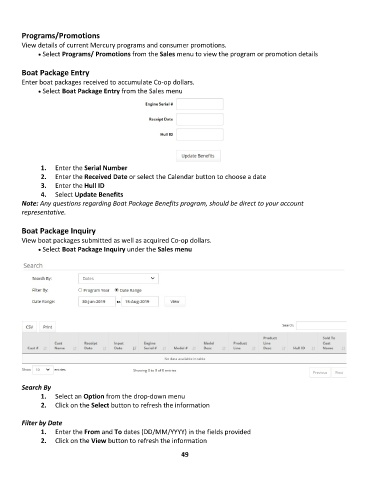
        Enter boat packages received to accumulate Co-op dollars.
              • •   Select Boat Package Entry from the Sales menu


               1.  Enter the Serial Number
               2.  Enter the Received Date or select the Calendar button to choose a date
               3.  Enter the Hull ID
               4.  Select Update Benefits
        Note: Any questions regarding Boat Package Benefits program, should be direct to your account
        representative.

        Boat Package Inquiry
        View boat packages submitted as well as acquired Co-op dollars.
              • •   Select Boat Package Inquiry under the Sales menu


        Search By
               1.  Select an Option from the drop-down menu
               2.  Click on the Select button to refresh the information

        Filter by Date
               1.  Enter the From and To dates (DD/MM/YYYY) in the fields provided
               2.  Click on the View button to refresh the information

                                                             49

