


Page 53 - MercNET User's Guide
P. 53
• % Paid – percentage paid on the claim
              • Amount Paid – amount paid on the claim
        Note: Column total should match Spent under Co-op Account Balances.
              • Pending Payment – displays the amount that is pending reimbursement per available funds. Relative to
               Awaiting Funds claim status only.
              • Credit Memo Number – the transaction number of the credit memo issued
        Note: Column total should match Pending Payment under Co-op Account Balances.

        View Claim Details
               1.  Select the Claim Number link
              • The details of the claim are displayed.
              • View the Claim Status at the bottom of the page.
              • If the claim is in a Correction Requested or Pending Documentation status the claim entry screen will
               display, and additional documents can be attached.

        Registration Inquiry
        Generates a list of registered engines and provides consumer’s contact information.
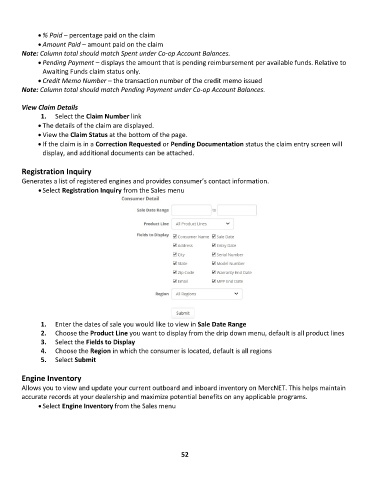
              • Select Registration Inquiry from the Sales menu


               1.  Enter the dates of sale you would like to view in Sale Date Range
               2.  Choose the Product Line you want to display from the drip down menu, default is all product lines
               3.  Select the Fields to Display
               4.  Choose the Region in which the consumer is located, default is all regions
               5.  Select Submit

        Engine Inventory
        Allows you to view and update your current outboard and inboard inventory on MercNET. This helps maintain
        accurate records at your dealership and maximize potential benefits on any applicable programs.
              • Select Engine Inventory from the Sales menu


                                                             52

