


Page 55 - MercNET User's Guide
P. 55
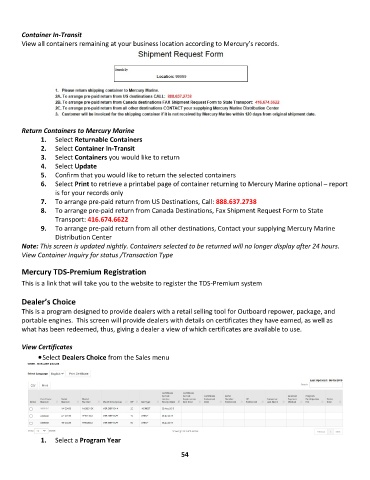
Container In-Transit
        View all containers remaining at your business location according to Mercury’s records.


        Return Containers to Mercury Marine
               1.  Select Returnable Containers
               2.  Select Container In-Transit
               3.  Select Containers you would like to return
               4.  Select Update
               5.  Confirm that you would like to return the selected containers
               6.  Select Print to retrieve a printabel page of container returning to Mercury Marine optional – report
                   is for your records only
               7.  To arrange pre-paid return from US Destinations, Call: 888.637.2738
               8.  To arrange pre-paid return from Canada Destinations, Fax Shipment Request Form to State
                   Transport: 416.674.6622
               9.  To arrange pre-paid return from all other destinations, Contact your supplying Mercury Marine
                   Distribution Center
        Note: This screen is updated nightly. Containers selected to be returned will no longer display after 24 hours.
        View Container Inquiry for status /Transaction Type

        Mercury TDS-Premium Registration

        This is a link that will take you to the website to register the TDS-Premium system

        Dealer’s Choice
        This is a program designed to provide dealers with a retail selling tool for Outboard repower, package, and
        portable engines.  This screen will provide dealers with details on certificates they have earned, as well as
        what has been redeemed, thus, giving a dealer a view of which certificates are available to use.

        View Certificates
              • Select Dealers Choice from the Sales menu


               1.  Select a Program Year

                                                             54

