


Page 51 - MercNET User's Guide
P. 51
Filter by Program Year
               1.  Select a Year from the drop-down menu
               2.  Click on the View button to refresh the information

        Co-op Advertising
        Submit a Co-op advertising claim to get reimbursed for your advertising efforts.
              • •   Select Co-op Advertising from the Sales menu
              • •   Select Co-op Advertising Entry

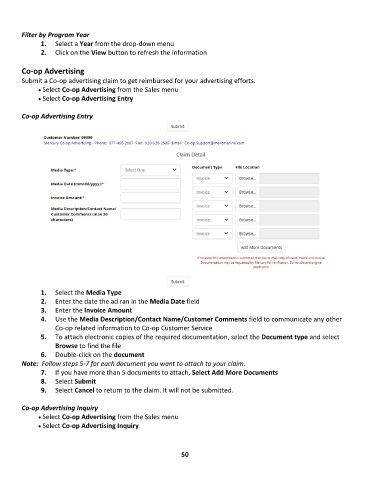
        Co-op Advertising Entry


               1.  Select the Media Type
               2.  Enter the date the ad ran in the Media Date field
               3.  Enter the Invoice Amount
               4.  Use the Media Description/Contact Name/Customer Comments field to communicate any other
                   Co-op related information to Co-op Customer Service
               5.  To attach electronic copies of the required documentation, select the Document type and select
                   Browse to find the file
               6.  Double-click on the document
        Note:  Follow steps 5-7 for each document you want to attach to your claim.
               7.  If you have more than 5 documents to attach, Select Add More Documents
               8.  Select Submit
               9.  Select Cancel to return to the claim. It will not be submitted.

        Co-op Advertising Inquiry
              • •   Select Co-op Advertising from the Sales menu
              • •   Select Co-op Advertising Inquiry


                                                             50

