


Page 25 - Installation Manual - GenII DTS
P. 25
Console Mount ERC—Dual Handle (Premier)
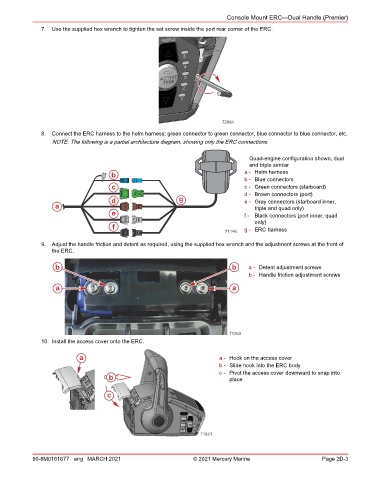
               7.  Use the supplied hex wrench to tighten the set screw inside the port rear corner of the ERC.


                                                                          72664
               8.  Connect the ERC harness to the helm harness: green connector to green connector, blue connector to blue connector, etc.
                  NOTE: The following is a partial architecture diagram, showing only the ERC connections.


                                                                                   Quad-engine configuration shown, dual
                                                                                   and triple similar
                                      b                                           a - Helm harness
                                                                                  b - Blue connectors
                                      c                                           c - Green connectors (starboard)
                                                                                  d - Brown connectors (port)
                                      d                     g                     e - Gray connectors (starboard inner,
                   a                                                                 triple and quad only)
                                      e                                           f - Black connectors (port inner, quad
                                                                                     only)
                                      f                                           g - ERC harness
                                                                           71146

               9.  Adjust the handle friction and detent as required, using the supplied hex wrench and the adjustment screws at the front of
                  the ERC.

                   b                                                          b    a - Detent adjustment screws
                                                                                   b - Handle friction adjustment screws
                   a                                                          a


                                                                             71263
               10. Install the access cover onto the ERC.

                           a                                              a - Hook on the access cover
                                                                          b - Slide hook into the ERC body
                                                                          c - Pivot the access cover downward to snap into
                                     b                                       place


                                    c


                                                                   71821


            90-8M0161677 eng MARCH 2021                          © 2021 Mercury Marine                      Page 2D-3

