


Page 8 - Computing book 6
P. 8
Analysing Data                                                                       Class 6


                                                   Analysing Data

               Use of Advanced Functions

               COUNT

               The COUNT function is used to calculate the number of cells that contain numbers, this function
               ignores the text values between the cells and only calculates numeric values.

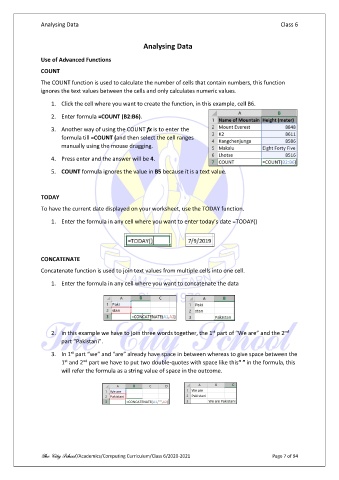
                   1.  Click the cell where you want to create the function, in this example, cell B6.

                   2.  Enter formula =COUNT (B2:B6).

                   3.  Another way of using the COUNT fx is to enter the
                       formula till =COUNT (and then select the cell ranges
                       manually using the mouse dragging.

                   4.  Press enter and the answer will be 4.

                   5.  COUNT formula ignores the value in B5 because it is a text value.


               TODAY
               To have the current date displayed on your worksheet, use the TODAY function.

                   1.  Enter the formula in any cell where you want to enter today’s date =TODAY()


               CONCATENATE

               Concatenate function is used to join text values from multiple cells into one cell.

                   1.  Enter the formula in any cell where you want to concatenate the data


                                                                            st
                                                                                                     nd
                   2.  in this example we have to join three words together, the 1  part of “We are” and the 2
                       part “Pakistani”.
                          st
                   3.  In 1  part “we” and “are” already have space in between whereas to give space between the
                        st
                              nd
                       1  and 2  part we have to put two double-quotes with space like this“ ” in the formula, this
                       will refer the formula as a string value of space in the outcome.


               The City School /Academics/Computing Curriculum/Class 6/2020-2021                 Page 7 of 94

