


Page 11 - Computing book 6
P. 11
Analysing Data                                                                       Class 6


               IF

               Excel’s IF function can often prove to be very useful. You can use this function to branch to different
               values or actions depending on a specified condition. The structure of an IF function is as follows:
               =IF (logical test, value if true, value if false)


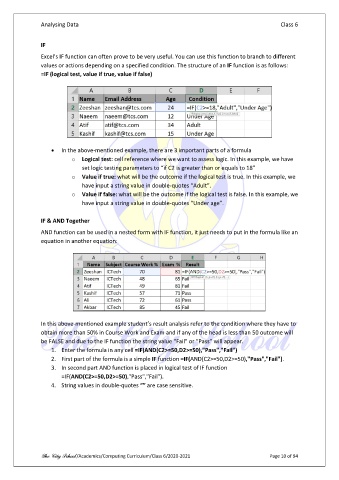
                   •  In the above-mentioned example, there are 3 important parts of a formula
                          o  Logical test: cell reference where we want to assess logic. In this example, we have
                              set logic testing parameters to “if C2 is greater than or equals to 18”
                          o  Value if true: what will be the outcome if the logical test is true. In this example, we
                              have input a string value in double-quotes “Adult”.
                          o  Value if false: what will be the outcome if the logical test is false. In this example, we
                              have input a string value in double-quotes “Under age”.

               IF & AND Together
               AND function can be used in a nested form with IF function, it just needs to put in the formula like an
               equation in another equation:


               In this above-mentioned example student’s result analysis refer to the condition where they have to
               obtain more than 50% in Course Work and Exam and if any of the head is less than 50 outcome will
               be FALSE and due to the IF function the string value “Fail” or “Pass” will appear.
                   1.  Enter the formula in any cell =IF(AND(C2>=50,D2>=50),"Pass","Fail")
                   2.  First part of the formula is a simple IF function =IF(AND(C2>=50,D2>=50),"Pass","Fail").
                   3.  In second part AND function is placed in logical test of IF function
                       =IF(AND(C2>=50,D2>=50),"Pass","Fail").
                   4.  String values in double-quotes “” are case sensitive.


               The City School /Academics/Computing Curriculum/Class 6/2020-2021                Page 10 of 94

