


Page 26 - Computing Book 4
P. 26
Let’s Present                                                                        Class 4


               WordArt:

               PowerPoint allows you to add effects to the text inside of a text box, which is known as WordArt.
               Types of effects you can add are the same as the ones you can add to shapes and text boxes (shadow,
               bevel, etc.). However, with WordArt, you can also change the text to give it a wavy, slanted, or
               inflated look.


               To Apply a WordArt style to text:
               A WordArt Style will automatically apply several effects to your text at once. You can then refine the
               look of your text by adding or modifying text effects.

                   1.  Select a text box, or select some text inside of the text box.

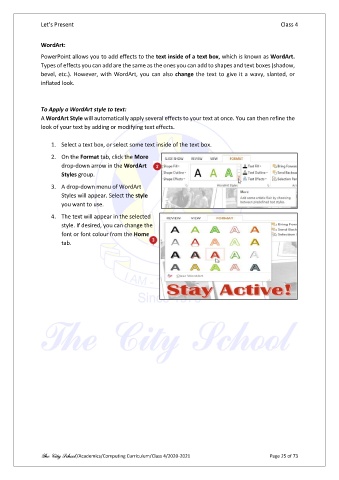
                   2.  On the Format tab, click the More
                       drop-down arrow in the WordArt
                       Styles group.
                   3.  A drop-down menu of WordArt
                       Styles will appear. Select the style
                       you want to use.

                   4.  The text will appear in the selected
                       style. If desired, you can change the
                       font or font colour from the Home
                       tab.


               The City School /Academics/Computing Curriculum/Class 4/2020-2021                Page 25 of 73

