


Page 22 - Computing Book 4
P. 22
Let’s Present                                                                        Class 4


                                                     Let’s Present

               What is PowerPoint:

               PowerPoint is a computer program that allows you to create and show slides to support a
               presentation. You can combine text, graphics and multimedia content to create professional
               presentations. PowerPoint presentations are made up of a series of slides. Slides contain the
               information you will present to your audience. This might include text, pictures, and charts.


               Insert a New Slide:
               Whenever you start a new presentation, it will contain one slide with the Title Slide layout. You can
               insert as many slides as you need from a variety of layouts.


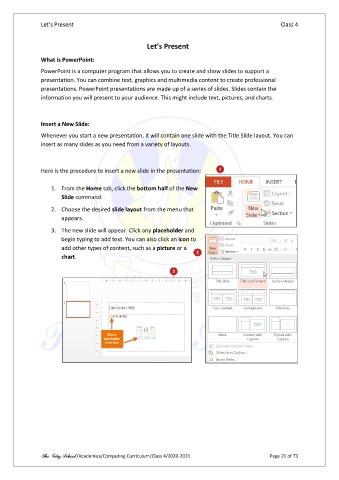
               Here is the procedure to insert a new slide in the presentation:

                   1.  From the Home tab, click the bottom half of the New
                       Slide command.
                   2.  Choose the desired slide layout from the menu that
                       appears.

                   3.  The new slide will appear. Click any placeholder and
                       begin typing to add text. You can also click an icon to
                       add other types of content, such as a picture or a
                       chart.


               The City School /Academics/Computing Curriculum/Class 4/2020-2021                Page 21 of 73

