


Page 58 - Computing Book 5
P. 58
Desktop Publishing                                                                   Class 5


               When you save the document for the first time, you can choose its name and location in the Save As
               dialogue. If you have already saved this document, the modified document will be saved under its
               existing name.
               To save a modified document under some other name, choose the Save As command under the File
               menu. Specify the new name and location in the Save As dialogue. The active document will get a
               new name and will be stored in the specified location.

               Applying or Customizing a Document Theme:
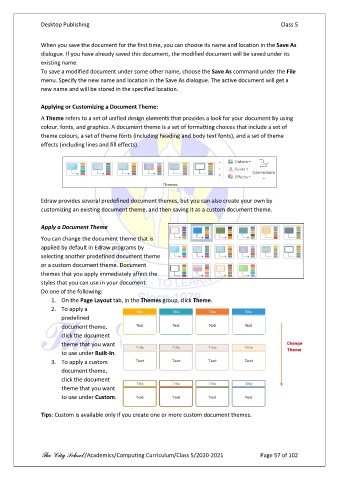
               A Theme refers to a set of unified design elements that provides a look for your document by using
               colour, fonts, and graphics. A document theme is a set of formatting choices that include a set of
               theme colours, a set of theme fonts (including heading and body text fonts), and a set of theme
               effects (including lines and fill effects).


               Edraw provides several predefined document themes, but you can also create your own by
               customizing an existing document theme, and then saving it as a custom document theme.

               Apply a Document Theme

               You can change the document theme that is
               applied by default in Edraw programs by
               selecting another predefined document theme
               or a custom document theme. Document
               themes that you apply immediately affect the
               styles that you can use in your document.
               Do one of the following:
                   1.  On the Page Layout tab, in the Themes group, click Theme.
                   2.  To apply a
                       predefined
                       document theme,
                       click the document
                       theme that you want
                       to use under Built-In.
                   3.  To apply a custom
                       document theme,
                       click the document
                       theme that you want
                       to use under Custom.

               Tips: Custom is available only if you create one or more custom document themes.


               The City School /Academics/Computing Curriculum/Class 5/2020-2021            Page 57 of 102

