


Page 73 - Computing Book 5
P. 73
Analysing Data                                                                       Class 5


               Basic functions of Excel:

               Excel has a variety of functions available. Here are some of the most common functions you will use:

                   •  SUM: This function adds all of the values of the cells in the argument.
                   •  AVERAGE: This function determines the average of the values included in the argument. It
                       calculates the sum of the cells and then divides that value by the number of cells in the
                       argument.
                   •  COUNT: This function counts the number of cells with numerical data in the argument. This
                       function is useful for quickly counting items in a cell range.
                   •  MAX: This function determines the highest cell value included in the argument.
                   •  MIN: This function determines the lowest cell value included in the argument.

               Create a function using the AutoSum command:

               The AutoSum command allows you to automatically insert the most common functions into your
               formula, including SUM, AVERAGE, COUNT, MIN, and MAX. In our example below, we will create a
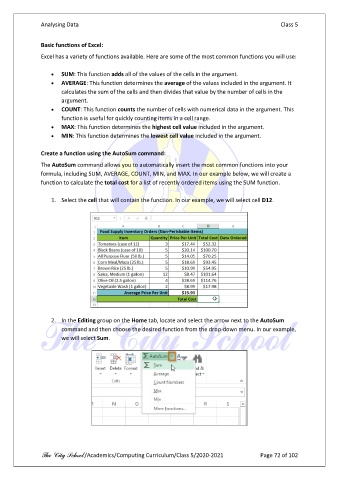
               function to calculate the total cost for a list of recently ordered items using the SUM function.

                   1.  Select the cell that will contain the function. In our example, we will select cell D12.


                   2.  In the Editing group on the Home tab, locate and select the arrow next to the AutoSum
                       command and then choose the desired function from the drop-down menu. In our example,
                       we will select Sum.


               The City School /Academics/Computing Curriculum/Class 5/2020-2021            Page 72 of 102

