


Page 71 - Computing Book 5
P. 71
Analysing Data                                                                       Class 5


                   3.  To change some of the currency numbers to another type of currency, such as Euros, select
                       the cells you want to change.
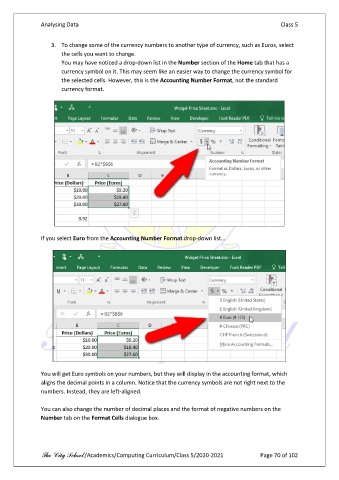
                       You may have noticed a drop-down list in the Number section of the Home tab that has a
                       currency symbol on it. This may seem like an easier way to change the currency symbol for
                       the selected cells. However, this is the Accounting Number Format, not the standard
                       currency format.


               If you select Euro from the Accounting Number Format drop-down list…


               You will get Euro symbols on your numbers, but they will display in the accounting format, which
               aligns the decimal points in a column. Notice that the currency symbols are not right next to the
               numbers. Instead, they are left-aligned.

               You can also change the number of decimal places and the format of negative numbers on the
               Number tab on the Format Cells dialogue box.


               The City School /Academics/Computing Curriculum/Class 5/2020-2021            Page 70 of 102

