


Page 68 - Computing Book 5
P. 68
Analysing Data                                                                       Class 5


                                                   Analysing Data

               Add a border to cells:

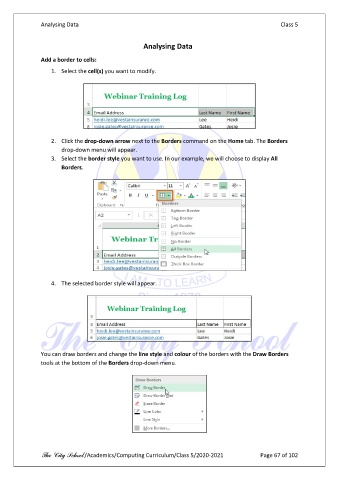
                   1.  Select the cell(s) you want to modify.


                   2.  Click the drop-down arrow next to the Borders command on the Home tab. The Borders
                       drop-down menu will appear.
                   3.  Select the border style you want to use. In our example, we will choose to display All
                       Borders.


                   4.  The selected border style will appear.


               You can draw borders and change the line style and colour of the borders with the Draw Borders
               tools at the bottom of the Borders drop-down menu.


               The City School /Academics/Computing Curriculum/Class 5/2020-2021            Page 67 of 102

