


Page 74 - Computing Book 5
P. 74
Analysing Data                                                                       Class 5


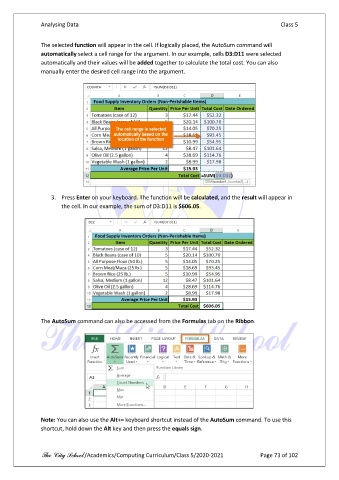
               The selected function will appear in the cell. If logically placed, the AutoSum command will
               automatically select a cell range for the argument. In our example, cells D3:D11 were selected
               automatically and their values will be added together to calculate the total cost. You can also
               manually enter the desired cell range into the argument.


                   3.  Press Enter on your keyboard. The function will be calculated, and the result will appear in
                       the cell. In our example, the sum of D3:D11 is $606.05.


               The AutoSum command can also be accessed from the Formulas tab on the Ribbon.


               Note: You can also use the Alt+= keyboard shortcut instead of the AutoSum command. To use this
               shortcut, hold down the Alt key and then press the equals sign.


               The City School /Academics/Computing Curriculum/Class 5/2020-2021            Page 73 of 102

