


Page 76 - JURNAL PENYELIDIKAN AKADEMIK
P. 76
J u r n a l   P e n y e l i d i k a n   A k a d e m i k   I P G M   J i l i d   5 / 2 0 2 0  | 69


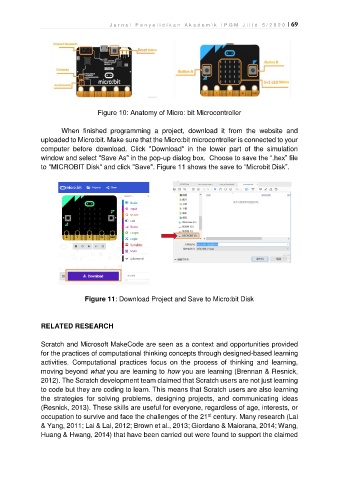
                                   Figure 10: Anatomy of Micro: bit Microcontroller

                       When  finished  programming  a  project,  download  it  from  the  website  and
               uploaded to Micro:bit. Make sure that the Micro:bit microcontroller is connected to your
               computer  before  download.  Click  "Download"  in  the  lower  part  of  the  simulation
               window and select "Save As" in the pop-up dialog box.  Choose to save the “.hex” file
               to "MICROBIT Disk" and click "Save". Figure 11 shows the save to “Microbit Disk”.


                               Figure 11: Download Project and Save to Micro:bit Disk


               RELATED RESEARCH

               Scratch and Microsoft MakeCode are seen as a context and opportunities provided
               for the practices of computational thinking concepts through designed-based learning
               activities.  Computational  practices  focus  on  the  process  of  thinking  and  learning,
               moving beyond what you are learning to how you are learning (Brennan & Resnick,
               2012). The Scratch development team claimed that Scratch users are not just learning
               to code but they are coding to learn. This means that Scratch users are also learning
               the  strategies  for  solving  problems,  designing  projects,  and  communicating  ideas
               (Resnick, 2013). These skills are useful for everyone, regardless of age, interests, or
                                                                          st
               occupation to survive and face the challenges of the 21  century. Many research (Lai
               & Yang, 2011; Lai & Lai, 2012; Brown et al., 2013; Giordano & Maiorana, 2014; Wang,
               Huang & Hwang, 2014) that have been carried out were found to support the claimed

