


Page 73 - JURNAL PENYELIDIKAN AKADEMIK
P. 73
J u r n a l   P e n y e l i d i k a n   A k a d e m i k   I P G M   J i l i d   5 / 2 0 2 0  | 66


               programming.  In  doing  Scratch  projects,  students  learn  to  think  creatively,  reason
               systematically, and work collaboratively (Resnick, 2013).

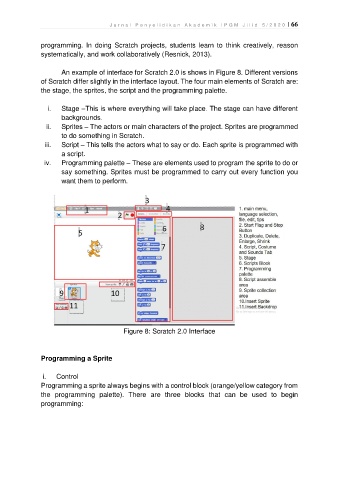
                       An example of interface for Scratch 2.0 is shows in Figure 8. Different versions
               of Scratch differ slightly in the interface layout. The four main elements of Scratch are:
               the stage, the sprites, the script and the programming palette.

                  i.   Stage –This is where everything will take place. The stage can have different
                       backgrounds.
                 ii.   Sprites – The actors or main characters of the project. Sprites are programmed
                       to do something in Scratch.
                 iii.   Script – This tells the actors what to say or do. Each sprite is programmed with
                       a script.
                 iv.   Programming palette – These are elements used to program the sprite to do or
                       say something. Sprites must be programmed to carry out every function you
                       want them to perform.


                                            Figure 8: Scratch 2.0 Interface


               Programming a Sprite

                i.   Control
               Programming a sprite always begins with a control block (orange/yellow category from
               the  programming  palette).  There  are  three  blocks  that  can  be  used  to  begin
               programming:

