


Page 2 - Employee Navigator Guide
P. 2
How to Add an Employee


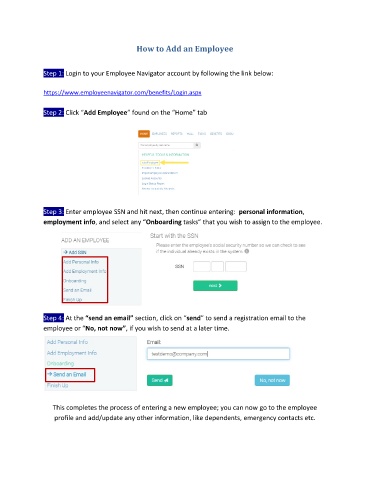
               Step 1: Login to your Employee Navigator account by following the link below:

               https://www.employeenavigator.com/benefits/Login.aspx

               Step 2: Click “Add Employee” found on the “Home” tab


               Step 3: Enter employee SSN and hit next, then continue entering:  personal information,
               employment info, and select any “Onboarding tasks” that you wish to assign to the employee.


               Step 4: At the “send an email” section, click on “send” to send a registration email to the
               employee or “No, not now”, if you wish to send at a later time.


                  This completes the process of entering a new employee; you can now go to the employee

                   profile and add/update any other information, like dependents, emergency contacts etc.

