


Page 33 - TCS ICT Book 8
P. 33
The City School  2021-2022


                                                                                                                    Advance Imaging


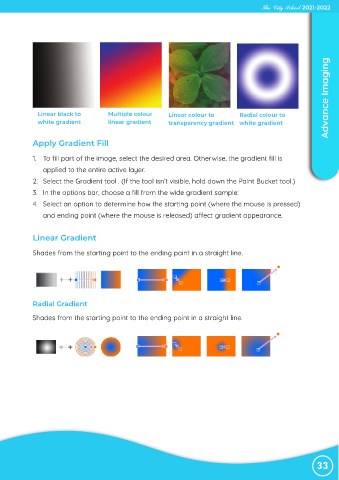
              Linear black to          Multiple colour      Linear colour to         Radial colour to
              white gradient           linear gradient      transparency gradient white gradient


             Apply Gradient Fill


             1.  To fill part of the image, select the desired area. Otherwise, the gradient fill is
                applied to the entire active layer.
             2.  Select the Gradient tool . (If the tool isn’t visible, hold down the Paint Bucket tool.)

             3.  In the options bar, choose a fill from the wide gradient sample:

             4.  Select an option to determine how the starting point (where the mouse is pressed)
                and ending point (where the mouse is released) affect gradient appearance.


             Linear Gradient

             Shades from the starting point to the ending point in a straight line.


             Radial Gradient
            Shades from the starting point to the ending point in a straight line.


                                                                                                                33

