


Page 97 - TCS ICT Book 8
P. 97
The City School  2021-2022


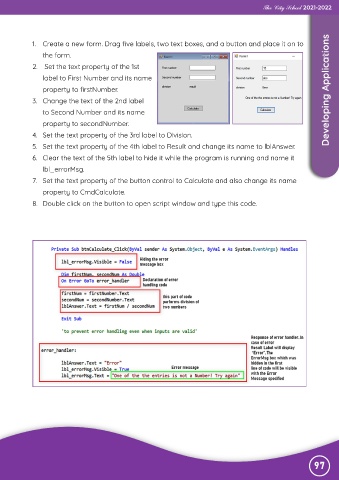
            1.  Create a new form. Drag five labels, two text boxes, and a button and place it on to

                the form.
            2.   Set the text property of the 1st

                label to First Number and its name
                property to firstNumber.                                                                            Developing Applications

            3.  Change the text of the 2nd label
                to Second Number and its name

                property to secondNumber.
            4.  Set the text property of the 3rd label to Division.

            5.  Set the text property of the 4th label to Result and change its name to lblAnswer.
            6.  Clear the text of the 5th label to hide it while the program is running and name it

                lbl_errorMsg.
            7.  Set the text property of the button control to Calculate and also change its name

                property to CmdCalculate.
            8.  Double click on the button to open script window and type this code.


                                                                                                               97

