


Page 96 - TCS ICT Book 8
P. 96
The City School  2021-2022


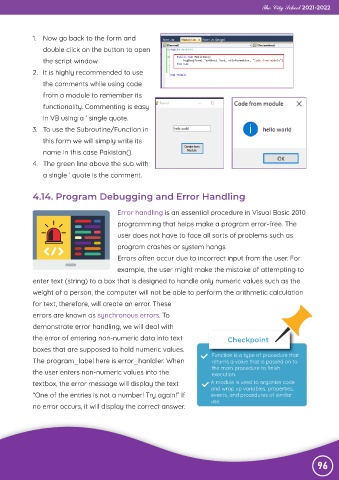
             1.  Now go back to the form and

                double click on the button to open
                the script window

             2.  It is highly recommended to use
                the comments while using code

                from a module to remember its
                functionality. Commenting is easy

                in VB using a ‘ single quote.
             3.  To use the Subroutine/Function in

                this form we will simply write its
                name in this case Pakistan().

             4.  The green line above the sub with
                a single ‘ quote is the comment.


             4.14. Program Debugging and Error Handling

                                          Error handling is an essential procedure in Visual Basic 2010

                                          programming that helps make a program error-free. The
                                          user does not have to face all sorts of problems such as

                                          program crashes or system hangs.
                                          Errors often occur due to incorrect input from the user. For

                                          example, the user might make the mistake of attempting to
             enter text (string) to a box that is designed to handle only numeric values such as the

             weight of a person, the computer will not be able to perform the arithmetic calculation
             for text, therefore, will create an error. These

             errors are known as synchronous errors. To
             demonstrate error handling, we will deal with

             the error of entering non-numeric data into text                    Checkpoint
             boxes that are supposed to hold numeric values.

             The program_label here is error_hanldler. When                Function is a type of procedure that
                                                                           returns a value that is passed on to
             the user enters non-numeric values into the                   the main procedure to finish
                                                                           execution.
             textbox, the error message will display the text              A module is used to organise code
                                                                           and wrap up variables, properties,
             “One of the entries is not a number! Try again!” If           events, and procedures of similar

             no error occurs, it will display the correct answer.          use.


                                                                                                                96

