


Page 94 - TCS ICT Book 8
P. 94
The City School  2021-2022


             Private Function functionName (Argument As dataType....) As dataType

             Public Function functionName (Argument As dataType....) As dataType


             Public: The keyword public indicates that the function applies to the whole project.

             Private: The keyword private indicates that the function only applies to a certain
             module or procedure.
             Arguments: The argument is a parameter that can pass a value back to the function.

             There is no limit to the number of arguments that can be added.

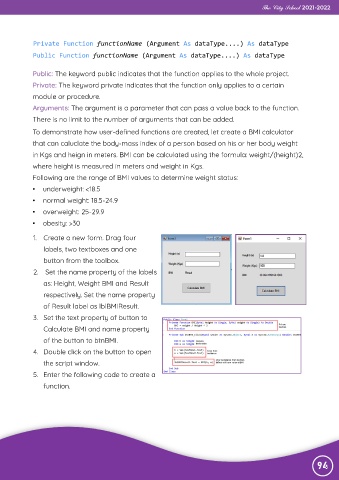
             To demonstrate how user-defined functions are created, let create a BMI calculator
             that can caluclate the body-mass index of a person based on his or her body weight

             in Kgs and heign in meters. BMI can be calculated using the formula: weight/(height)2,
             where height is measured in meters and weight in Kgs.

             Following are the range of BMI values to determine weight status:
             •  underweight: <18.5

             •  normal weight: 18.5-24.9
             •  overweight: 25-29.9

             •  obesity: >30

             1.  Create a new form. Drag four

                labels, two textboxes and one
                button from the toolbox.
             2.   Set the name property of the labels

                as: Height, Weight BMI and Result

                respectively. Set the name property
                of Result label as lblBMIResult.
             3.  Set the text property of button to

                Calculate BMI and name property

                of the button to btnBMI.
             4.  Double click on the button to open
                the script window.

             5.  Enter the following code to create a

                function.


                                                                                                                94

