


Page 95 - TCS ICT Book 8
P. 95
The City School  2021-2022


             4.13.  Modules


             Visual Basic application source code is structured

             into module files with a .vb suffix. By default, Visual           Checkpoint
             Studio creates a separate module file for each form          Decision making statements,

             in an application containing the code to construct           give different results for different      Developing Applications
                                                                          inputs.
             the form. For example, the code to create a form             Loops allow a sequence of
                                                                          instructions to be repeated until
             called Form1 will be placed in a module file named           a certain condition is reached.
             Form1.Designer.vb. Similarly, any code that has

             been defined by the developer to handle events from controls in the form will be
             placed by Visual Studio into a module file called Form1.vb. Using modules in VB

             are recommended while creating a complex application as they save space in
             your code and also assist to reuse of code like functions.


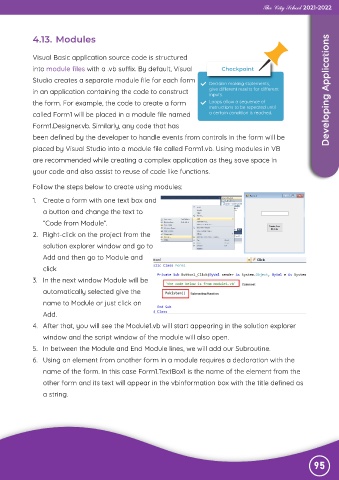
             Follow the steps below to create using modules:

             1.  Create a form with one text box and
                a button and change the text to

                “Code from Module”.
             2.  Right-click on the project from the

                solution explorer window and go to
                Add and then go to Module and

                click
             3.  In the next window Module will be

                automatically selected give the
                name to Module or just click on

                Add.
             4.  After that, you will see the Module1.vb will start appearing in the solution explorer

                window and the script window of the module will also open.
             5.  In between the Module and End Module lines, we will add our Subroutine.

             6.  Using an element from another form in a module requires a declaration with the
                name of the form. In this case Form1.TextBox1 is the name of the element from the

                other form and its text will appear in the vbinformation box with the title defined as
                a string.


                                                                                                               95

