


Page 93 - TCS ICT Book 8
P. 93
The City School  2021-2022


             Follow the steps to create a program in which we will detect the MouseHover
             event in VS. In the following example, we are going to display a pop-up window

             containing a message, whenever the mouse hovers on the button inside our
             program’s form.


             1.  Create a new form only with one                                                                    Developing Applications

                button.
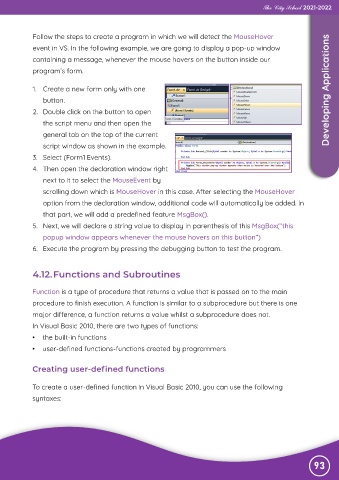
             2.  Double click on the button to open

                the script menu and then open the
                general tab on the top of the current

                script window as shown in the example.
             3.  Select (Form1 Events).

             4.  Then open the declaration window right
                next to it to select the MouseEvent by

                scrolling down which is MouseHover in this case. After selecting the MouseHover
                option from the declaration window, additional code will automatically be added. In

                that part, we will add a predefined feature MsgBox().
             5.  Next, we will declare a string value to display in parenthesis of this MsgBox(“this

                popup window appears whenever the mouse hovers on this button”)
             6.  Execute the program by pressing the debugging button to test the program.


             4.12. Functions and Subroutines


            Function is a type of procedure that returns a value that is passed on to the main
            procedure to finish execution. A function is similar to a subprocedure but there is one

            major difference, a function returns a value whilst a subprocedure does not.
            In Visual Basic 2010, there are two types of functions:

            •  the built-in functions
            •  user-defined functions-functions created by programmers


            Creating user-defined functions


            To create a user-defined function in Visual Basic 2010, you can use the following
            syntaxes:


                                                                                                               93

