


Page 61 - TCS ICT Book 5
P. 61
The City School  2021-2022


           2.8.  Advanced Presentation Options


           You will now learn how to rehearse and record slide shows in advance. You will
           also learn about alternative presentation options, such as creating a video of your

           presentation or presenting your slide show online to remote audiences. Finally, you

           will learn how to customize your presentation with hidden or rearranged slides.                         Presenting Your Ideas


           Rehearsing Slide Show Timings


           Rehearsing timings can be useful if

           you want to set up a presentation to                     Checkpoint
           play at a certain speed without having

           to click through the slides to present it.         Slide transition is the visual effect that
           Think of it as a tool to help you practice         occurs when you move from one slide
                                                              to the next.
           presenting your slide show. Using this
           feature, you can save timings for each             Animation is applied to individual
                                                              elements on a slide.
           slide and animation.
           PowerPoint will then playback the

           presentation with the same timings when
           you present it.


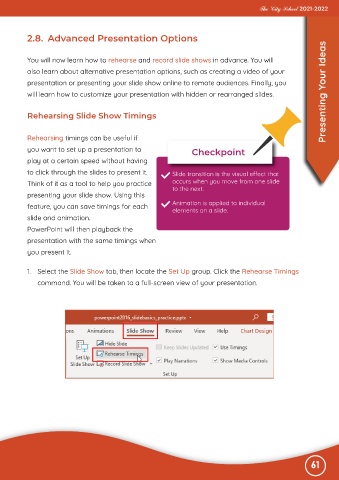
           1.  Select the Slide Show tab, then locate the Set Up group. Click the Rehearse Timings

              command. You will be taken to a full-screen view of your presentation.


                                                                                                              61

