


Page 34 - TCS ICT Book 7
P. 34
The City School  2021-2022


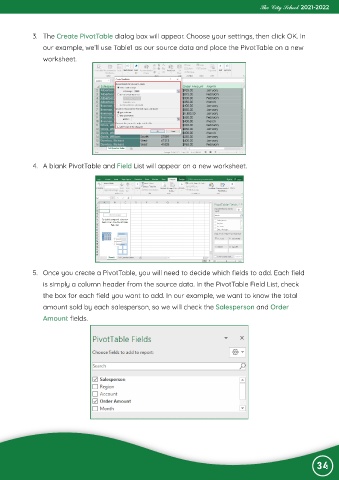
             3.  The Create PivotTable dialog box will appear. Choose your settings, then click OK. In
                our example, we’ll use Table1 as our source data and place the PivotTable on a new

                worksheet.


             4.  A blank PivotTable and Field List will appear on a new worksheet.


             5.  Once you create a PivotTable, you will need to decide which fields to add. Each field
                is simply a column header from the source data. In the PivotTable Field List, check

                the box for each field you want to add. In our example, we want to know the total
                amount sold by each salesperson, so we will check the Salesperson and Order

                Amount fields.


                                                                                                                34

