


Page 133 - Learn To Program With Scratch
P. 133
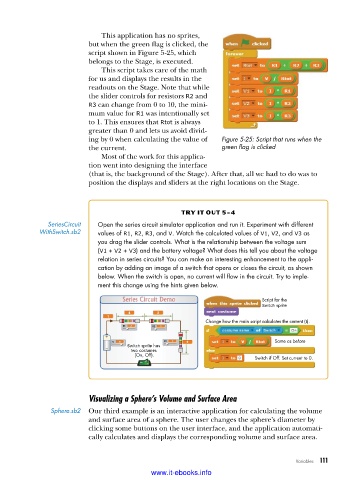
This application has no sprites,
                          but when the green flag is clicked, the
                          script shown in Figure 5-25, which
                          belongs to the Stage, is executed.
                             This script takes care of the math
                          for us and displays the results in the
                          readouts on the Stage. Note that while
                          the slider controls for resistors R2 and
                          R3 can change from 0 to 10, the mini-
                          mum value for R1 was intentionally set
                          to 1. This ensures that Rtot is always
                          greater than 0 and lets us avoid divid-
                          ing by 0 when calculating the value of   Figure 5-25: Script that runs when the
                          the current.                         green flag is clicked
                             Most of the work for this applica-
                          tion went into designing the interface
                          (that is, the background of the Stage). After that, all we had to do was to
                          position the displays and sliders at the right locations on the Stage.


                                                   try it out 5-4
              SeriesCircuit   Open the series circuit simulator application and run it . Experiment with different
            WithSwitch .sb2  values of R1, R2, R3, and V . Watch the calculated values of V1, V2, and V3 as
                            you drag the slider controls . What is the relationship between the voltage sum
                            (V1 + V2 + V3) and the battery voltage? What does this tell you about the voltage
                            relation in series circuits? You can make an interesting enhancement to the appli-
                            cation by adding an image of a switch that opens or closes the circuit, as shown
                            below . When the switch is open, no current will flow in the circuit . Try to imple-
                            ment this change using the hints given below .

                                                                          Script for the
                                                                          Switch sprite
                                                          Change how the main script calculates the current (I).


                                                                             Same as before
                                    Switch sprite has
                                     two costumes
                                      (On, Off).
                                                                        Switch if Off. Set current to 0.


                          Visualizing a Sphere’s Volume and Surface Area
               Sphere .sb2  Our third example is an interactive application for calculating the volume
                          and surface area of a sphere. The user changes the sphere’s diameter by
                          clicking some buttons on the user interface, and the application automati-
                          cally calculates and displays the corresponding volume and surface area.


                                                                                   Variables   111

                                           www.it-ebooks.info

