


Page 156 - Learn To Program With Scratch
P. 156
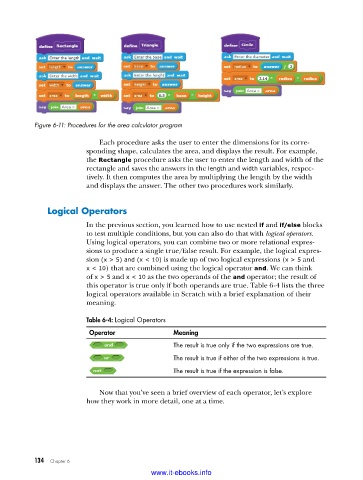
Figure 6-11: Procedures for the area calculator program

                             Each procedure asks the user to enter the dimensions for its corre-
                         sponding shape, calculates the area, and displays the result. For example,
                         the Rectangle procedure asks the user to enter the length and width of the
                         rectangle and saves the answers in the length and width variables, respec-
                         tively. It then computes the area by multiplying the length by the width
                         and displays the answer. The other two procedures work similarly.


              Logical operators
                         In the previous section, you learned how to use nested if and if/else blocks
                         to test multiple conditions, but you can also do that with logical operators.
                         Using logical operators, you can combine two or more relational expres-
                         sions to produce a single true/false result. For example, the logical expres-
                         sion (x > 5) and (x < 10) is made up of two logical expressions (x > 5 and
                         x < 10) that are combined using the logical operator and. We can think
                         of x > 5 and x < 10 as the two operands of the and operator; the result of
                         this operator is true only if both operands are true. Table 6-4 lists the three
                         logical operators available in Scratch with a brief explanation of their
                         meaning.

                         Table 6-4: Logical Operators
                          Operator               Meaning
                                                 The result is true only if the two expressions are true .
                                                 The result is true if either of the two expressions is true .

                                                 The result is true if the expression is false .

                             Now that you’ve seen a brief overview of each operator, let’s explore
                         how they work in more detail, one at a time.


           134   Chapter 6
                                           www.it-ebooks.info

