


Page 155 - Learn To Program With Scratch
P. 155
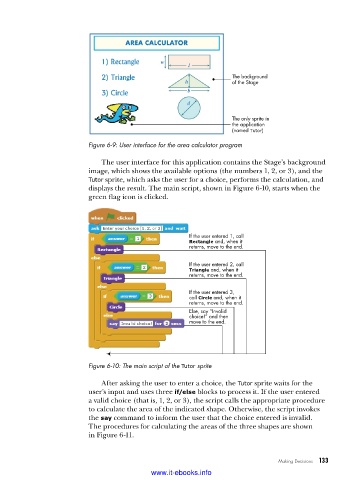
The background
                                                                 of the Stage


                                                                 The only sprite in
                                                                 the application
                                                                 (named Tutor)
                          Figure 6-9: User interface for the area calculator program

                             The user interface for this application contains the Stage’s background
                          image, which shows the available options (the numbers 1, 2, or 3), and the
                          Tutor sprite, which asks the user for a choice, performs the calculation, and
                          displays the result. The main script, shown in Figure 6-10, starts when the
                          green flag icon is clicked.


                                                      If the user entered 1, call
                                                      Rectangle and, when it
                                                      returns, move to the end.

                                                      If the user entered 2, call
                                                      Triangle and, when it
                                                      returns, move to the end.

                                                      If the user entered 3,
                                                      call Circle and, when it
                                                      returns, move to the end.
                                                      Else, say “Invalid
                                                      choice!” and then
                                                      move to the end.


                          Figure 6-10: The main script of the Tutor sprite

                             After asking the user to enter a choice, the Tutor sprite waits for the
                          user’s input and uses three if/else blocks to process it. If the user entered
                          a valid choice (that is, 1, 2, or 3), the script calls the appropriate procedure
                          to calculate the area of the indicated shape. Otherwise, the script invokes
                          the say command to inform the user that the choice entered is invalid.
                          The procedures for calculating the areas of the three shapes are shown
                          in Figure 6-11.


                                                                              Making Decisions   133

                                           www.it-ebooks.info

