


Page 151 - Learn To Program With Scratch
P. 151
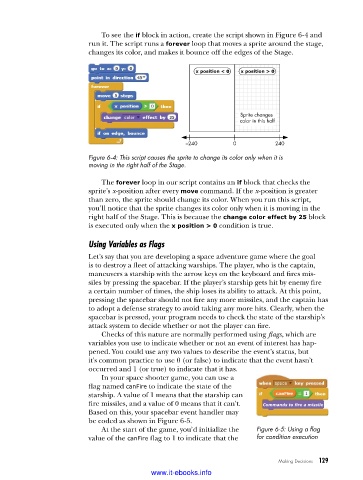
To see the if block in action, create the script shown in Figure 6-4 and
                          run it. The script runs a forever loop that moves a sprite around the stage,
                          changes its color, and makes it bounce off the edges of the Stage.


                                                       x position < 0   x position > 0


                                                                    Sprite changes
                                                                    color in this half


                                                     –240         0          240

                          Figure 6-4: This script causes the sprite to change its color only when it is
                          moving in the right half of the Stage .

                             The forever loop in our script contains an if block that checks the
                          sprite’s x-position after every move command. If the x-position is greater
                          than zero, the sprite should change its color. When you run this script,
                          you’ll notice that the sprite changes its color only when it is moving in the
                          right half of the Stage. This is because the change color effect by 25 block
                          is executed only when the x position > 0 condition is true.

                          Using Variables as Flags

                          Let’s say that you are developing a space adventure game where the goal
                          is to destroy a fleet of attacking warships. The player, who is the captain,
                          maneuvers a starship with the arrow keys on the keyboard and fires mis-
                          siles by pressing the spacebar. If the player’s starship gets hit by enemy fire
                          a certain number of times, the ship loses its ability to attack. At this point,
                          pressing the spacebar should not fire any more missiles, and the captain has
                          to adopt a defense strategy to avoid taking any more hits. Clearly, when the
                          spacebar is pressed, your program needs to check the state of the starship’s
                          attack system to decide whether or not the player can fire.
                             Checks of this nature are normally performed using flags, which are
                          variables you use to indicate whether or not an event of interest has hap-
                          pened. You could use any two values to describe the event’s status, but
                          it’s common practice to use 0 (or false) to indicate that the event hasn’t
                          occurred and 1 (or true) to indicate that it has.
                             In your space shooter game, you can use a
                          flag named canFire to indicate the state of the
                          starship. A value of 1 means that the starship can
                          fire missiles, and a value of 0 means that it can’t.   Commands to fire a missile
                          Based on this, your spacebar event handler may
                          be coded as shown in Figure 6-5.
                             At the start of the game, you’d initialize the   Figure 6-5: Using a flag
                          value of the canFire flag to 1 to indicate that the   for condition execution


                                                                              Making Decisions   129

                                           www.it-ebooks.info

